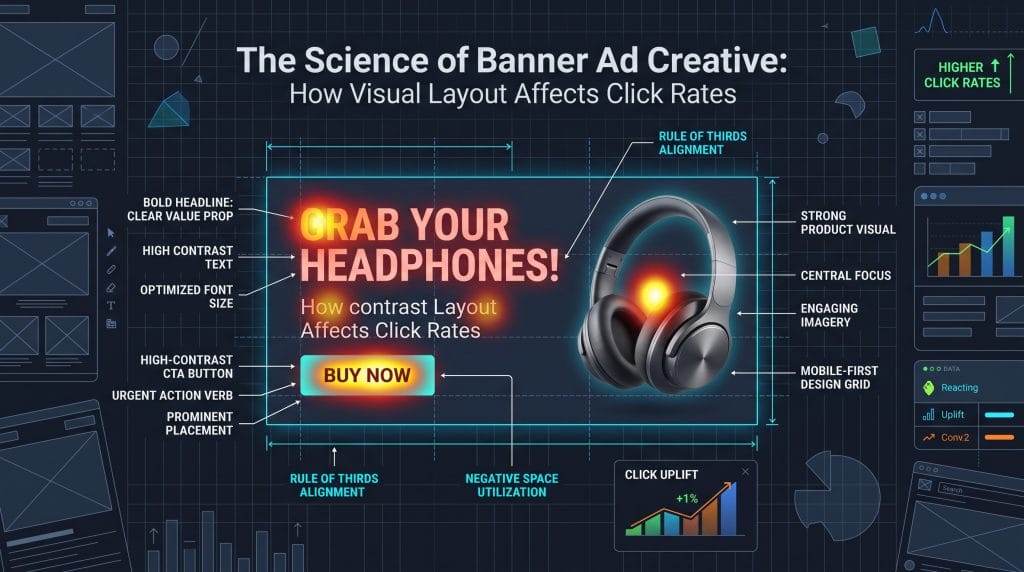
In display advertising, you have less than 1.5 seconds to grab attention before someone scrolls past your ad. Media buying gets you onto the page, but the design decides whether that impression turns into a click.
High-converting banners rely on practical visual psychology rather than aesthetic personal taste. Here is a practical guide to structuring display ad layouts for maximum click-through rates.
People process web pages through quick, involuntary eye movements. Because display banners sit in the peripheral vision while someone reads article content, your design needs enough visual contrast to break their focus and pull their eyes in.
The eye moves to high-contrast elements first. Avoid pastel combinations or monochromatic schemes across the entire graphic. Pair a dark background with bright foreground elements, or do the exact opposite, so the viewer instantly catches an anchor point.
Busy banners force the brain to parse too much detail at once, causing readers to ignore the ad. Leave at least 30% to 40% of the canvas empty around your headline and main button. Giving elements room to breathe artificially increases their visual scale and makes them easy to spot.
Every banner format requires a tailored visual hierarchy. Regardless of dimensions, a strong banner organizes three core components in order: your logo, your value proposition, and your call-to-action button.
Layout pattern: Vertical top-to-bottom stack
Place your logo at the top left or top center. Put the main offer directly in the center, and anchor a clear CTA button right below it at the bottom. This aligns with standard reading habits, letting the user scan the brand, offer, and button in one quick downward motion.
Plaintext
+--------------------------+
|  [Logo / Brand Mark]     |
|                          |
|  Main Value Proposition  |
|  Headline Goes Here      |
|                          |
|  [ CTA BUTTON NOW ]      |
+--------------------------+
Layout pattern: Left-to-right linear flow
Position your logo on the far left, run the value proposition across the center, and place the CTA button on the far right. This layout works with horizontal scanning habits along page headers. A user reads the offer across the middle and lands on the interactive button on the right edge.
Plaintext
+-----------------------------------------------------------------+
| [Logo] |  Your Transformative Value Proposition Here  | [ CTA ] |
+-----------------------------------------------------------------+
Layout pattern: Top-weighted vertical hierarchy
Put your logo at the top, keep the main text and supporting visual in the upper-middle section, and place a fixed CTA near the bottom. Skyscraper units stay in peripheral view while users scroll. Putting the core offer near the top catches attention early, while the bottom button guides the eye as the page moves down.
The CTA button is the main interactive element in your banner. A frequent mistake is matching the button color to the main brand palette, which makes it blend into the background.
The Von Restorff effect shows that when similar items are grouped together, the one with a distinct visual difference stands out most. Choose a button color that contrasts with the rest of the ad and does not appear elsewhere in the design.
| Ad Background Tone | Recommended Button Color | Visual Result |
| Cool Navy Blue or Slate | Bright Amber (#FFB000) or Orange | Strong isolation |
| Warm Crimson or Magenta | Bright Cyan or Emerald Green | Immediate visual shift |
| Neutral Charcoal or Dark Gray | High-Luminance Lime Green | High contrast pop |
Generic phrases like "Learn More" or "Click Here" perform poorly. Use actionable phrases that clearly state what happens next:
Banner typography needs to communicate instantly rather than act as body copy. Keep character counts minimal and font choices clear.
Stick to clean sans-serif typefaces such as Inter, Roboto, Montserrat, or Helvetica Bold. Avoid delicate scripts, ornate serifs, or ultra-thin font weights that blur on small screens.
Headlines with 7 words or fewer get better reader recall. If someone cannot read the message in half a second, they move on.
Stick to a maximum of two font sizes per banner. Use a large, bold font for the main headline, and use a clear, medium-weight font for the button. Leave sub-headlines, disclaimers, and extra paragraphs off the banner and put them on the landing page instead.
Audit your banner ads against these 5 quick checks before launching a campaign:
In a crowded digital market, reaching the right audience is not about buying ad space and hoping people see it. Traditional advertising often relies on broad assumptions, leaving business owners guessing which parts of their budget brought in sales. Growth requires precise targeting, multi-screen coverage, and clear tracking.
Relying on separate vendors or closed networks leads to wasted ad spend. To build market share, a brand needs to reach customers across the places they spend time, whether that means a smart TV in the living room, a podcast on a commute, or a phone in the evening.
Full Force Ads, a digital advertising agency based in Utah, consolidates multi-channel marketing. Instead of managing multiple vendors, businesses can use a single programmatic setup built to track performance. The platform allows brands to run targeted campaigns across screens and channels.
The customer journey is rarely a straight line. A prospect might see an ad on a smart TV in the morning, hear an audio spot on Spotify at lunch, and browse on a mobile device in the evening. Maintaining brand awareness requires a presence across these touchpoints.
Full Force Ads provides access to several digital channels through one platform:
Channel coverage only works when paired with proper audience selection. Showing a video ad to the wrong audience wastes capital, while showing it to an active buyer creates a customer.
Targeting systems depend heavily on ad creative. Static artwork scaled down to fit a small rectangle rarely performs well. Improving click-through rates requires applying basic layout and design principles:
Different business goals call for different channel combinations:
| Objective | Recommended Channels & Targeting | Primary Goal |
| Local Brand Awareness | Geofencing + Mobile + Display | Build impression share in target areas |
| Competitor Conquesting | Geofencing (Competitor Locations) + Addressable | Reach users actively visiting rivals |
| Enterprise Brand Building | Streaming TV + Video + Digital Audio | Establish presence with unskippable TV and audio |
| Website Traffic | Display + Native + Search Retargeting | Capture search intent and reader traffic |
| Conversion Retargeting | Site Retargeting + Display + Video | Re-engage site visitors who left without converting |
| Customer List Activation | Addressable + Streaming TV + Display | Target offline customer lists with online ads |
Full Force Ads structures its services around unified execution and direct performance reporting.
FullForceAds.app): Provides an optional self-serve interface. Teams can upload artwork, adjust targeting settings, launch campaigns, and track metrics directly.